Download Live22 for iPhone, Android, Mac and Windows
Live22 offered four builds in 2018, including a rare Mac version, and it downloads many games separately inside the app. What to expect when installing.
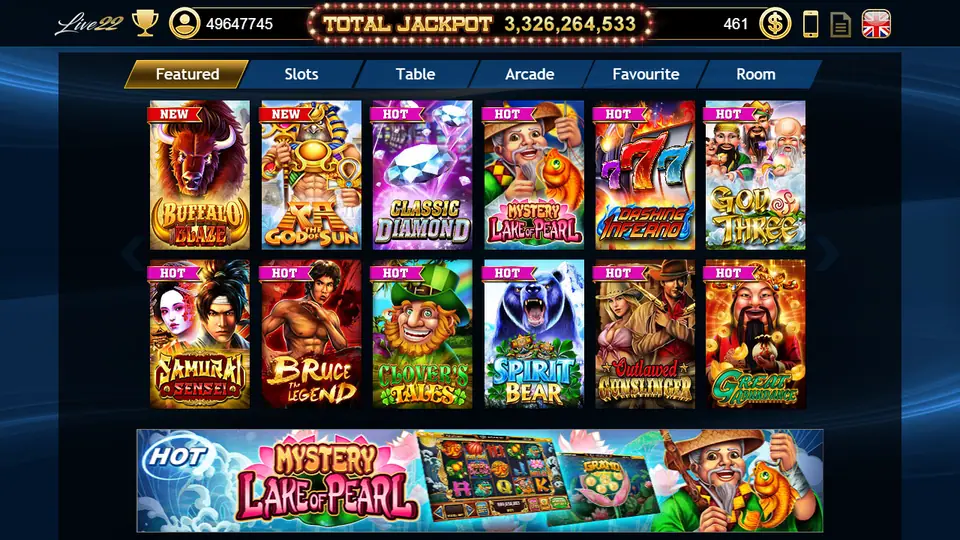
Live22 stood out on the 2018 download list for one reason: it was the only platform with a Mac version. Most of the apps in this group are phone-only, with Windows added as an afterthought. Live22 covered four systems.
We no longer link the files. The old installers were hosted in a storage bucket that has since been emptied, and a casino app of unknown origin is not something to install on a hunch.
The four builds on the old page
The 2018 page offered:
- iOS for iPhone, installed through an enterprise link rather than the App Store
- Android APK
- Mac
- Windows
Each is a separate install. One game ID is meant to work across them, so you can switch between a phone and a computer without a second account.
Games download inside the app
Live22 does not ship every game in the first install. On the lobby, some tiles carry a Tap to Download label with an arrow icon, and the game only opens after that extra download finishes.

Two practical points follow from that:
- Storage. Open ten games and you have downloaded ten games. On a phone that is nearly full, games may fail to install with no clear error.
- Wi-Fi first. Do the first run of a new game on Wi-Fi, not mobile data.
Installing on each system
iPhone. The app is signed with an enterprise certificate. After installing, you usually have to trust the developer profile under Settings > General > Device Management before it opens. Only do that for an app from a source you trust.
Android. You will be asked to allow installs from the browser or file manager that opened the APK. Turn that permission off again when you are done.
Mac and Windows. Expect a warning that the app is from an unidentified developer. It will not be notarised by Apple or signed in a way Windows recognises. That warning is the operating system doing its job. Treat it as a reason to be sure of where the file came from.
Getting the current installer and a game ID
Live22 builds change and the lobby is useless without a login. There is no registration screen, and IDs are created by agents. Ask for both at once: get a Live22 game ID and download link from our partner, so the build and the account come from the same place.
Once you are in, look at the top bar. The balance should appear next to the dollar icon, and the Featured, Slots and Table tabs should load. If they do, the install is fine.
For what is inside the lobby, from the four jackpot meters to classic three-reel games, read our Live22 guide.
Questions players ask
Why do some Live22 games say Tap to Download?
The app does not install every game up front. Some tiles have to be downloaded the first time you open them, which takes a moment and some storage.
Is there a Live22 app for Mac?
The 2018 download page listed a Mac version alongside Windows, Android and iPhone. Ask whoever issues your ID whether a current Mac build still exists.
Do I need a different download for each device?
Yes, each system has its own build. One game ID is meant to work on all of them, but confirm that with whoever issues it.
Check-in desk
Want to try it yourself? Get a game ID through our partner link, then set a spending limit before the first spin.